Tesla Unity Configuration#
These settings are specific to the tesla-unity branch used on preAP Tesla Model S. They are found in Settings on your comma device.
Do not enable settings for hardware you haven’t installed (pedal, radar, etc.) — the software expects data from those devices and will not work correctly without them.
If you have questions, join the xnor community Discord.
General Settings#
These apply to all Tesla models running the tesla-unity branch.
| Setting | Type | Description |
|---|---|---|
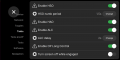
| Enable HSO | Toggle | Human Steering Override — lets you take the wheel without disengaging openpilot. When you let go, openpilot resumes steering. |
| HSO numb period | Number (seconds) | How long openpilot waits before checking if you’re still steering. Default: 1.5s. Too low = fighting openpilot, too high = slow to resume. |
| Enable HAO | Toggle | Human Acceleration Override — lets you press the accelerator without disengaging openpilot. |
| Enable ALC | Toggle | Automatic Lane Change — tap the turn signal stalk to change lanes after a delay. On preAP cars (no blind spot monitoring), always check your blind spot manually before initiating. Fully press the stalk to cancel. |
| ALC delay | Number (seconds) | Delay before lane change begins after tapping the stalk. Touch the wheel in the lane change direction to start immediately. |
| Enable OP Long Control | Toggle | Allows openpilot to control acceleration and braking. Off = lane keep only (preAP) or stock Tesla cruise (HW1/HW2). |
| Turn screen off while engaged | Toggle | Turns off the display when there are no warnings. Screen turns back on automatically when needed. |
| Hide GPS Warnings | Toggle | Suppresses GPS quality warnings caused by Tesla’s window coatings. |
| Shutdown after # of hours | Number (hours) | Auto-shutdown the comma device after the car has been off for this many hours. |
| Flash Panda | Button | Flashes the panda firmware inside your comma device. Needed after each software update. |
preAP Settings#
These apply only to preAP Tesla Model S.
| Setting | Type | Description |
|---|---|---|
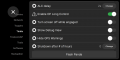
| Force PreAP Tesla Model S | Toggle | Must be ON for preAP Model S. Must be OFF for any other Tesla. |
| Tesla software post 2019.16 | Toggle | Leave ON unless you’re running Tesla firmware older than 2019.16. |
| Use pedal | Toggle | Turn ON if you have a comma pedal installed. Leave OFF otherwise. |
| Use pedal over CC | Toggle | Always use pedal-based cruise (PCC) instead of Tesla cruise. Disables stock cruise control entirely. |
| Pedal on CAN0 | Toggle | Turn ON only if your pedal is on CAN0 (e.g. connected to harness box RJ45). Leave OFF if connected to the OBD-C Adapter (CAN2). |
| Follow Distance | Number (seconds) | Distance to the lead car. Speed-dependent — at 60 MPH, 1.0s = 27m (89ft). |
| Use Tesla Radar | Toggle | Enable only if you have a Tesla Bosch Radar installed and configured. |
| Radar behind nosecone | Toggle | Turn ON if your radar is behind the nosecone. Set this before doing Radar VIN Learn. |
| Radar offset | Number (meters) | Horizontal distance from the center of the nosecone to the center of the radar. Positive = left (from driver’s perspective). |
| Car has iBooster | Toggle | Enable if you have an iBooster installed for full stop-and-go. |
| Flash EPAS | Button | Patches the EPAS to allow openpilot to steer. Required on first install, and possibly after Tesla firmware updates. |
| Flash Pedal | Button | Flashes Tesla firmware onto a newly installed comma pedal. Set your pedal toggles first. |
| Radar VIN Learn | Button | Programs your car’s VIN and radar position onto a Tesla Bosch Radar. Set all radar toggles first. |


Speed Limit Settings#
These apply to all Tesla models.
| Setting | Type | Description |
|---|---|---|
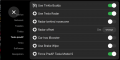
| Adjust ACC max with speed limit | Toggle | Automatically adjusts cruise max speed based on the detected speed limit plus your offset. |
| Use relative offset | Toggle | When ON, the offset is a percentage of the speed limit (e.g. 15% of 60 = 69 MPH). When OFF, it’s a fixed value (e.g. 60 + 15 = 75 MPH). |
| Speed limit offset | Number | The offset value — in MPH/km/h (fixed) or % (relative), depending on the toggle above. |
| Use MadMax Mode | Toggle | More aggressive acceleration. Leave OFF until you’re comfortable with how openpilot drives. |
