Troubleshooting#
“openpilot Longitudinal (Alpha)” not selectable#
Ensure the Longitudinal Upgrade Kit is fully plugged in and powered. Try pressing the brake pedal — the option may appear after the comma device detects the hardware.
Speed doesn’t match set speed (off by ~4 MPH)#
Make sure Experimental Mode is not toggled on. In Experimental Mode, openpilot determines its own speed without using your set speed. If you want Experimental Mode with set speed control, enable Dynamic Experimental Mode instead — it switches between Experimental and Chill Mode based on driving context.
Software download stalls#
Downloads can stall due to mesh network issues. Try switching to a mobile hotspot or Connect+ connection.
Comma powers on but camera doesn’t engage when pressing brake#
The OBD-C cable may not be fully inserted into the comma device. You should hear and feel an audible click when it’s fully seated. If only partially inserted, power reaches the device but data doesn’t.
Make sure you are using the OBD-C cable that came with your harness. If you need a replacement, use a USB-C 3.2 Gen 1 cable — standard USB-C 2.0 cables will not work as they lack the necessary data lines.
Error lights on driver display after installation#
Try the following procedures in order. Check if the comma operates properly after each step — you may not need all three.
1. Hazard Reset#
Hold down the left-most steering wheel button and the hazard button (above the mirror) simultaneously until the Rivian’s displays turn off. This software reset takes under 10 minutes.
Do not perform a second hazard reset within one hour of the first.
2. Deep Sleep#
- Close all doors and lock the Rivian
- Walk away with all phones and key fobs out of range
- Wait at least 30 minutes for all modules to power down completely
3. High Voltage Reset#
This is an advanced procedure. Contact Rivian service if you are not comfortable performing it.
- Open the driver’s side window and leave the door ajar (to avoid lockout when cutting power)
- Open the hood and remove the air intake cover
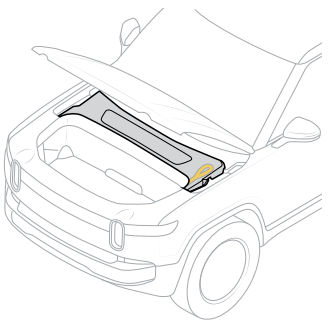
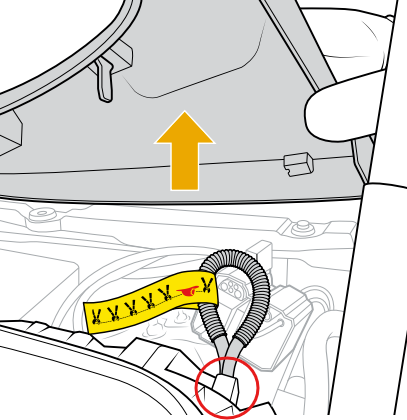
- Disconnect the fireman’s loop connector by pressing the release tab and pulling on the loop — this cuts high-voltage battery power. Do not cut the loop.
- Disconnect the negative 12V battery terminal cable(s). Early model Rivians have two 12V batteries.
- Let the vehicle rest at least 30 minutes
- Reconnect the negative battery terminal(s). If two 12V batteries, reconnect them in sequence as quickly as possible.
- Reconnect the fireman’s loop connector and replace the air intake cover
- Wake the Rivian and perform a Hazard Reset