Tesla Model S/X with HW2#
AP2 Teslas control steering via the Chassis CAN bus and acceleration/braking via the Powertrain CAN bus. To get full lateral and longitudinal control, openpilot needs access to both buses simultaneously. The xnor AP2 harness is a dual CAN interceptor box that handles both buses in a single kit — no need to build separate harnesses.
Quick Start#
- Get the Tesla Model S/X (AP2 / HW2) - Harness — includes the dual CAN interceptor box and all cables
- Get a comma four (or comma 3X)
- Connect your comma device to the harness (see wiring instructions below)
- Install the xnor fork of openpilot
- Take your Tesla for a test drive with openpilot!
- If you see “Car Unrecognized”, fingerprint your car
Supported Devices#
- comma four or comma 3X — recommended
- comma three (deprecated)
See Installing openpilot for the correct version for your device. For details on comma hardware, see the comma hardware repository.
Harness Install Location#
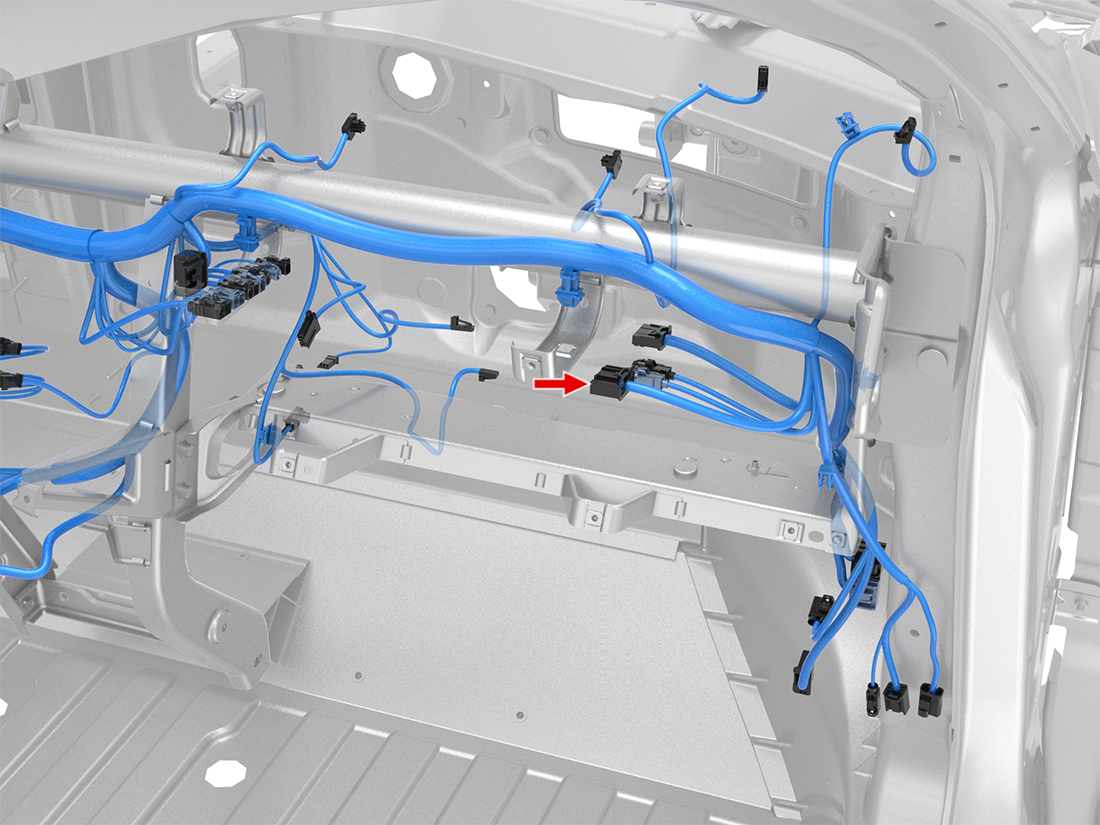
The harness installs at the autopilot computer behind the glovebox.
Wiring#

The dual CAN interceptor box has two ports. Both must be connected to your comma device:
1. Connect OBD-C (Port 1)#
Connect one end of the OBD-C cable to Port 1 on the dual CAN interceptor box. Connect the other end to the OBD-C port on your comma device.
Depending on your vehicle model, you may need an OBD-C extension cable. If so, connect the included extension cable to the OBD-C cable that came with your comma device to increase its length.
2. Connect USB-C (Port 2)#
Connect one end of the USB-C 2.0 cable to Port 2 (auxiliary port) on your comma device. Connect the other end to the corresponding Port 2 on the dual CAN interceptor box.