Tesla Bosch Radar#
The Bosch radar (MRRevo14, part numbers 1038224-00-A/B or 1057551-00-B) was used on Tesla Model S cars from October 2014 (AP1) until it was replaced by the Continental radar with AP2.5. The main difference between the -A and -B versions is that the -A does not have a heater element for winter weather.
The radar has a range of about 160m and a short-beam cone of 45 degrees. It can track up to 32 objects simultaneously.
What It Does#
Adding a Tesla Bosch Radar to your preAP Model S gives openpilot more accurate lead car detection, which improves adaptive cruise control (ACC). Without the radar, openpilot relies on vision-only detection which has a 1–2 second delay and only tracks one car. With the radar, you get real-time tracking of up to 32 objects including cars in adjacent lanes.
How It Connects#
The radar connects to the Tesla Model S (preAP) - OBD-C Adapter / Harness via the JST2.5 connector on CAN1. The OBD-C Adapter already has a built-in 120 ohm termination resistor on this CAN bus — no need to add one yourself.
What You Need#
- A Tesla Bosch Radar (commonly found on eBay from AP1 donor cars)
- A mounting bracket (behind the nose cone or front bumper)
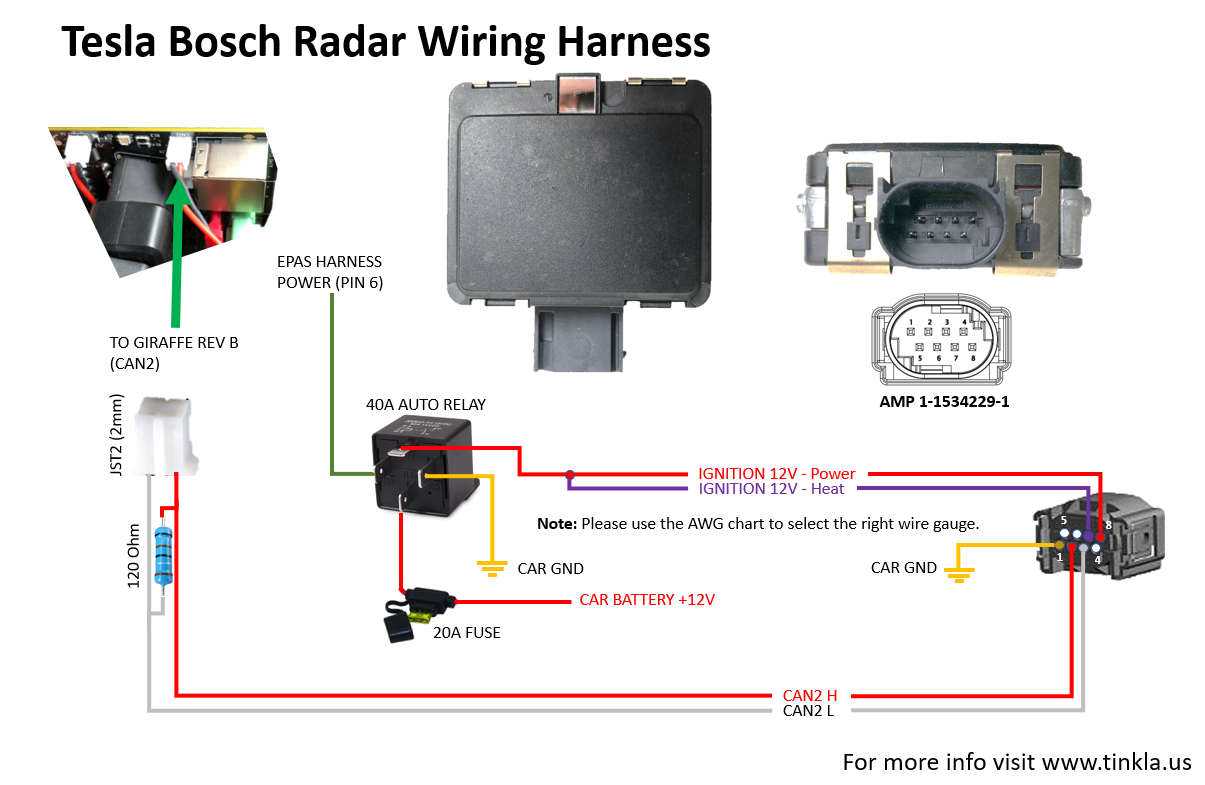
- A connector and wiring harness to run from the radar to the OBD-C Adapter’s JST2.5 CAN1 port
- The radar needs both CAN and 12V power — use EPAS ignition power through a relay to power both the radar electronics and heater
Configuration#
Enable Radar in Settings#
In the Tesla preAP settings:
- Use Tesla Radar — turn ON
- Radar behind nosecone — turn ON if you installed the radar behind the nose cone (set this before doing the VIN learn process)
- Radar offset — set the horizontal distance (in meters) between the center of the car and the center of the radar, if the radar is off-center. Positive values = towards the left of the car (as seen from the driver seat).
Obtain the VIN Programmed in Your Radar#
Most radars from eBay were previously installed in another car. The radar will only respond if you send the correct VIN that was programmed into it.
To read the VIN:
- SSH into your comma device
- Navigate to
/data/openpilot/selfdrive/car/tesla/radar_tools/ - Kill openpilot:
tmux kill-session -t comma - Set the Python path:
export PYTHONPATH="/data/openpilot/" - Run:
python readRadarVin.py
The 17-character VIN will be displayed (e.g. 5YJSA1E41FF156789). Write it down.
Configure the Radar Parameters#
Edit the openpilot configuration file with the radar parameters:
[OP_CONFIG]
use_tesla_radar = True
enable_radar_emulation = True
radar_vin = YOUR_RADAR_VIN_HERE
radar_offset = 0.0
radar_epas_type = 0
radar_position = 0- radar_vin — the VIN from the readRadarVin script (no quotes, just the VIN)
- radar_offset — distance in meters if the radar is off-center (e.g. 0.58 for 58cm)
The following settings must match the donor car (the car the radar came from), not your car. Use VIN Decoder to look up the donor car’s details.
radar_epas_type — the EPAS type of the donor car:
- 0 — Bosch L538
- 1 — Bosch L405
- 2 — Mando FGR64
- 3 — Mando VGR66
- 4 — Mando VGR66 Gen3
Pre-facelift AP1 cars are typically 0 or 1. Post-facelift cars are typically 3 or 4. You may need to try different values until RADC_a062_strRackMismatch in the TeslaRadarAlertMatrix message reads 0.
radar_position — the radar position in the donor car:
- 0 — Model S (pre-facelift)
- 1 — Model S (post-facelift)
- 2 — Model X
2014–2015 Model S is always 0. 2017+ Model S is always 1. 2016 Model S could be 0 (pre-April) or 1 (post-April). Check RADC_a061_radPositionMismatch — it should be 0 when set correctly.
Reboot your comma device after saving the configuration.
Calibrating the Radar#
You will need:
- A 4ft (120cm) metal pole that can stand vertically (e.g. a microphone stand)
- Tape measure and chalk
- A computer or phone to SSH into your comma device
Find the Center Line of the Car#
- From the left front wheel well, measure 8ft (2.5m) towards the center and draw an arc with chalk
- Repeat from the right front wheel — the arcs intersect at point A
- Repeat both measurements at 16.5ft (5m) — the arcs intersect at point B
- Connect A and B with a line — this is the center line of the car
Run the Calibration Script#
- Start openpilot (keep the car on by sitting in the driver seat with the seatbelt connected)
- SSH into your comma device
cd /data/openpilot/selfdrive/car/tesla/radar_tools/export PYTHONPATH="/data/openpilot/"python calibrateRadar.py
The script shows data for objects between 8ft (2.5m) and 15ft (4.5m) in front of the car.
Adjust the Radar#
- Place the metal pole on the center line between A and B
- Check the dRel (distance) and dY (lateral offset) values in the script output
- dRel should match the measured distance from the radar to the pole
- dY should be 0.0 — if not, adjust the radar left or right
- If the pole isn’t detected or dRel is too large, adjust the radar vertically
- Move the pole along the center line and repeat — you’re done when dY is always 0.0
Troubleshooting#
The radar sends data for the first 5 seconds regardless of what you send it. If the VIN, position, or EPAS type is wrong, it will stop updating after 5 seconds.
Use Cabana to inspect the TeslaRadarAlertMatrix message (look at 1:501, not 0:501) and check for errors. Calibration warnings will not stop the radar from operating.
For help, join discord.xnor.shop.